 December 4, 2025
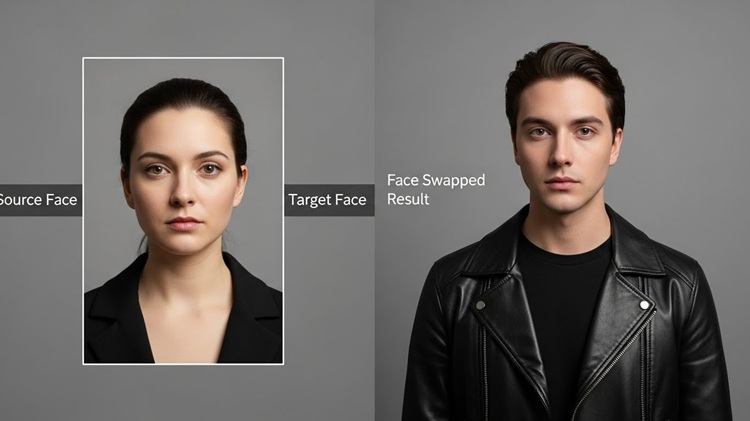
Face swap technology has transformed digital creativity in 2025, making it easier than ever to replace faces in photos and videos with stunning realism. Whether you’re a content creator, marketer, filmmaker, or just experimenting with AI, today’s face-swap tools offer unmatched speed, accuracy, and versatility. With advanced video editing features, lip-sync precision, and high-resolution outputs, these platforms are reshaping how visual content is produced. In this guide, we break down the best Face Swap tools of 2025 – with Magic Hour leading the list.
The Best Face Swap AI Tools at a Glance (2025)
Here are the top face-swap AI tools of 2025 that creators, video editors, and digital content makers should know about. Each of these tools offers unique features, from easy mobile editing to advanced video face-swap capabilities:
| Tool | Best For | Modalities | Platforms | Free Plan Available | Starting Paid Price (Monthly) |
| 1. Magic Hour AI | Professional Video & Hyper-Realism | Image, Video, GIF, Live Stream | Web, API | (Generous) | $15/month (Creator) |
| 2. Reface | Quick Social Media Memes & GIFs | Video, GIF | iOS, Android, Web | (Limited) | $9.99/month |
| 3. HeyGen | Talking Head Videos & AI Avatars | Video, Image | Web | No | $24/month (Creator) |
| 4. DeepSwap | Fast, High-Quality Deepfake Clips | Video, Image, GIF | Web | (Trial/Limited) | $9.99/month |
| 5. DeepFaceLab | Researchers & Advanced AI Developers | Video, Image | Desktop (Requires GPU) | (Open Source) | Free |
1 – Magic Hour
If you’re serious about AI-powered face swap and video production, Magic Hour deserves the #1 spot – and here’s why.
- All-in-one AI platform: Magic Hour supports not only face-swap (images and video) but also lip sync, talking photos, video-to-video editing, image-to-video conversions, background removal, and more.
- Flexible pricing & entry point: There’s a free forever “Basic” plan (400 credits, watermarked output) – good for testing. Their paid plans are: Creator at $15/month (or $12/mo with yearly billing), and Business for high-volume work.
- Strong video face-swap + lip-sync workflow: Magic Hour handles face replacement and synchronizes mouth movements with audio – great for creating talking-head videos, dubbing, or localized content.
- Scales with your needs: For hobbyists, the free/basic plan may suffice; for professional editors or agencies, Pro or Business tiers unlock higher resolution, larger uploads, and longer video durations.
Given its versatility, ease of use, and balanced pricing for quality output, Magic Hour stands out as the best overall face-swap / video-AI tool for 2025.
Other Noteworthy Tools
Reface
- Pros: Mobile-first and extremely easy to use; great for quick face swaps in photos, GIFs, or short videos – ideal for social media, memes, or fun content.
- Cons: Less control and lower resolution compared to tools like Magic Hour, so not ideal for professional video production.
FaceMagic
- Good balance of simplicity and functionality. Works for both image and video face swaps, offering a friendly interface for users who don’t need full-blown video-editing suites.
AIFaceSwap.io
- Strong for multi-face and dynamic scenes: can replace multiple faces at once (useful for group photos or crowd scenes), and offers video & GIF support. Useful for projects needing bulk or multi-person face swaps without complex setup.
DeepFaceLab (Advanced / open-source)
- Best suited for technically proficient users who want maximum control. As an open-source solution, it can offer high customization and powerful face-swap realism – but requires more technical knowledge and often a good GPU.
How We Chose These Tools
- Versatility & feature set: Preference to tools supporting both image and video face-swap – plus extras like lip-sync, talking photos, and video editing.
- Usability for a range of users: From beginners (mobile-based, easy UI) to pros (full-featured, high-res exports).
- Pricing fairness & accessibility: Tools that offer a free or low-cost entry point, plus scalable paid tiers for heavier usage.
- Quality of output: Realism of face swap, reliability of lip-sync (if offered), export resolution – all key for professional-looking content.
- Reputation & ongoing development: Tools that remain updated and supported in 2025.
Market Trends (2025) for Face-Swap & AI Video Tools
- Growing demand for AI-powered talking-head & localization content: With globalization and remote content creation, face-swap + lip-sync tools are increasingly used to dub videos into different languages while maintaining lip-movement realism.
- Shift toward all-in-one platforms: Instead of juggling multiple tools (one for face-swap, one for subtitles, one for video editing), creators lean toward platforms offering end-to-end workflows – like Magic Hour.
- Rise of mobile-first & quick-edit tools: Casual creators and social-media users prefer fast, easy-to-use face-swap apps (like Reface, FaceMagic) for memes, short reels, or quick edits.
- Increased interest from small studios and indie creators: Lower cost of entry (via free or affordable plans) enables indie filmmakers, marketers, and content creators to access high-end video editing tools without big budgets.
- Growing need for ethical and privacy-conscious use: As face-swap becomes more realistic, the conversation around ethics, consent, deepfakes, and privacy intensifies. Creators are more often asked to respect subject consent, disclaim usage, or avoid misuse.
Short FAQs
Can I try face-swap for free on Magic Hour?
Yes – Magic Hour offers a Free (Basic) plan with 400 credits (watermarked output, limited resolution), sufficient for small tests or occasional swaps.
Is video face-swap much harder or more demanding than image face-swap?
Yes – video face-swap often requires more processing power, and quality depends on source video resolution, lighting, and motion. Tools like Magic Hour or DeepFaceLab give better controls and results for video.
Are mobile-first tools like Reface good for professional content?
They’re fine for social media posts, memes, or informal content. But for high-quality video content, short films, or marketing material, you’ll likely need more powerful tools (higher resolution, better export options).
Can I reuse or commercially exploit face-swap content generated with these tools?
Depends on the tools’ usage/licensing terms. For instance, Magic Hour’s paid plans support commercial use (per their pricing page). Always check each tool’s terms.